
MainWP Boilerplate Extension
Write standard pages like a Privacy Policy once and publish them to your child sites with each site’s details.

![Boilerplate Posts list in the MainWP Dashboard with three boilerplate posts that use site tokens such as [name.site] in their titles](https://mainwp.com/wp-content/uploads/2026/10/mainwp-boilerplate-posts-2026.jpg)
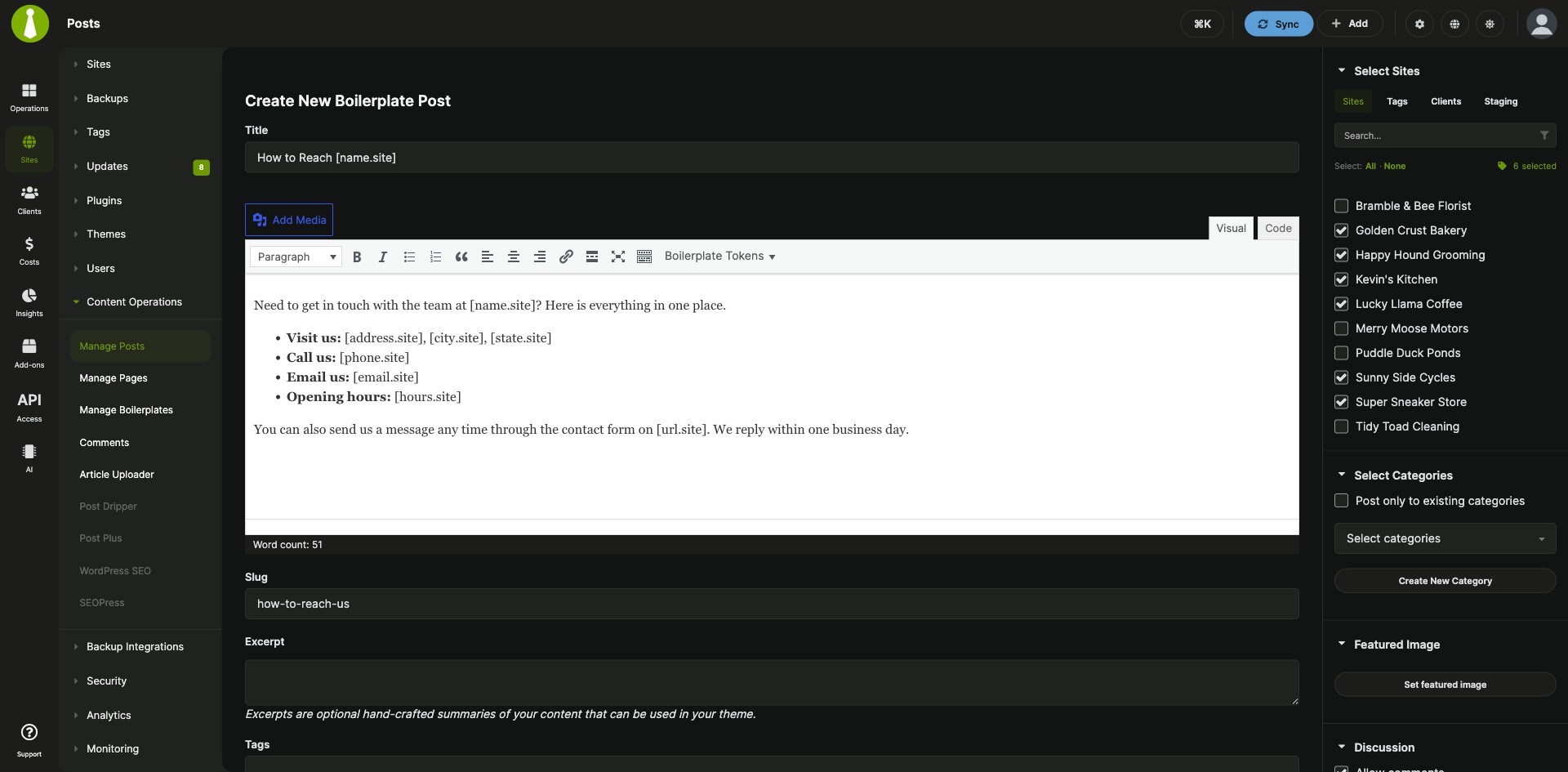
Publish standard pages with per-site details to all your child sites from your MainWP Dashboard
The Boilerplate Extension is a Pro MainWP add-on that publishes repeated pages and posts, such as a Privacy Policy, About Us, Terms of Use or Support Policy page, to your child sites from one source. Tokens in the text fill in each site’s own details, and when you edit the source, the change goes to every site that has it.
What the Boilerplate Extension replaces
Without the extension, a standard page has to be created on each site by hand, with that site’s name, URL and address typed into the text. With the Boilerplate Extension, you write the page once with tokens, enter each site’s token values once, and publish it to the sites you pick. Later edits, new sites and removals are handled from the same place in your MainWP Dashboard.
Boilerplate Extension features
| Feature | What it means for you |
|---|---|
| Boilerplate posts and pages | Write a post or page once and publish it to the child sites you select. On each child site it is a regular WordPress post or page. |
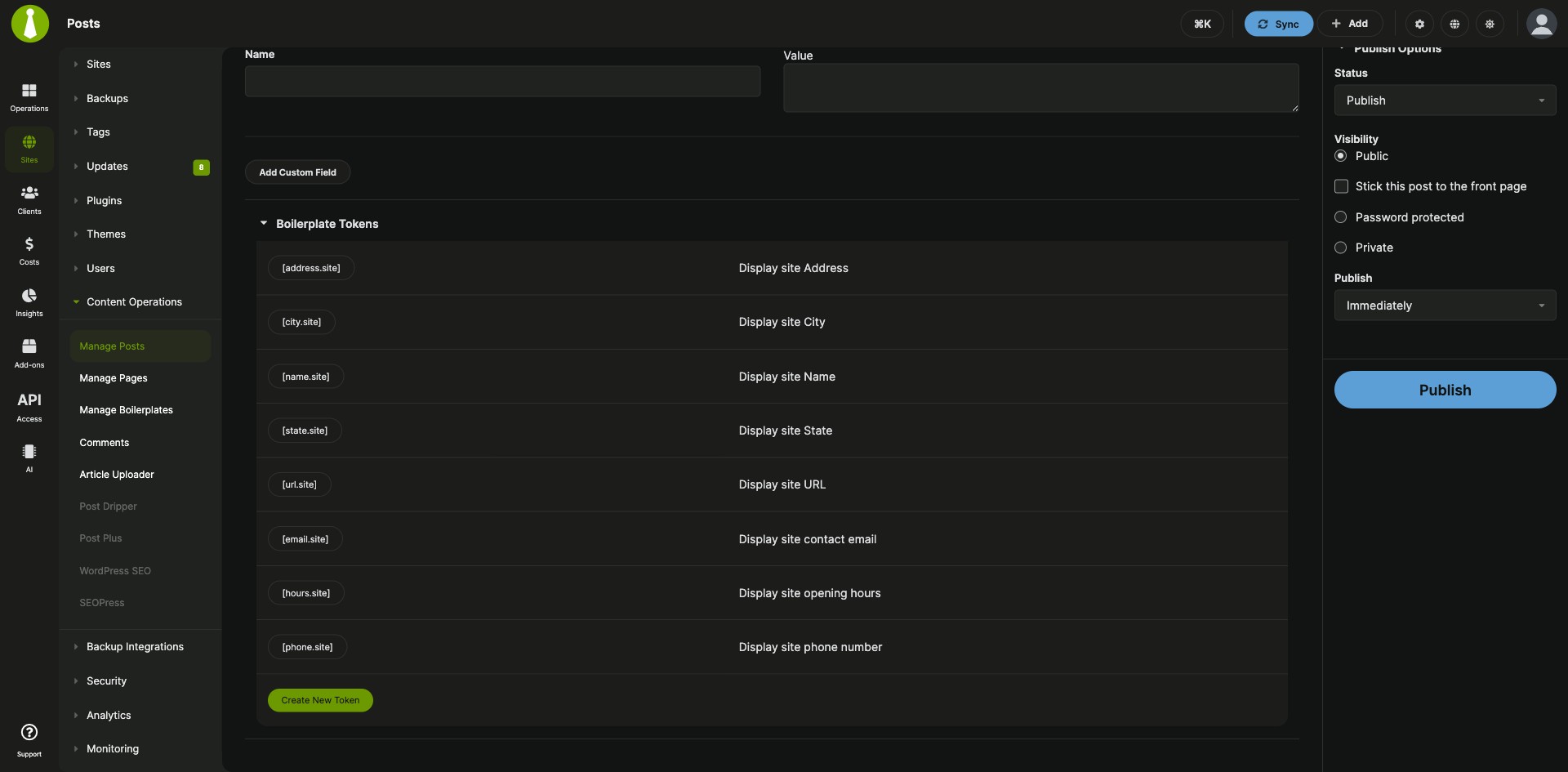
| Default tokens | Use [url.site], [name.site], [state.site], [city.site] and [address.site] to show the site URL, name, state, city and address. |
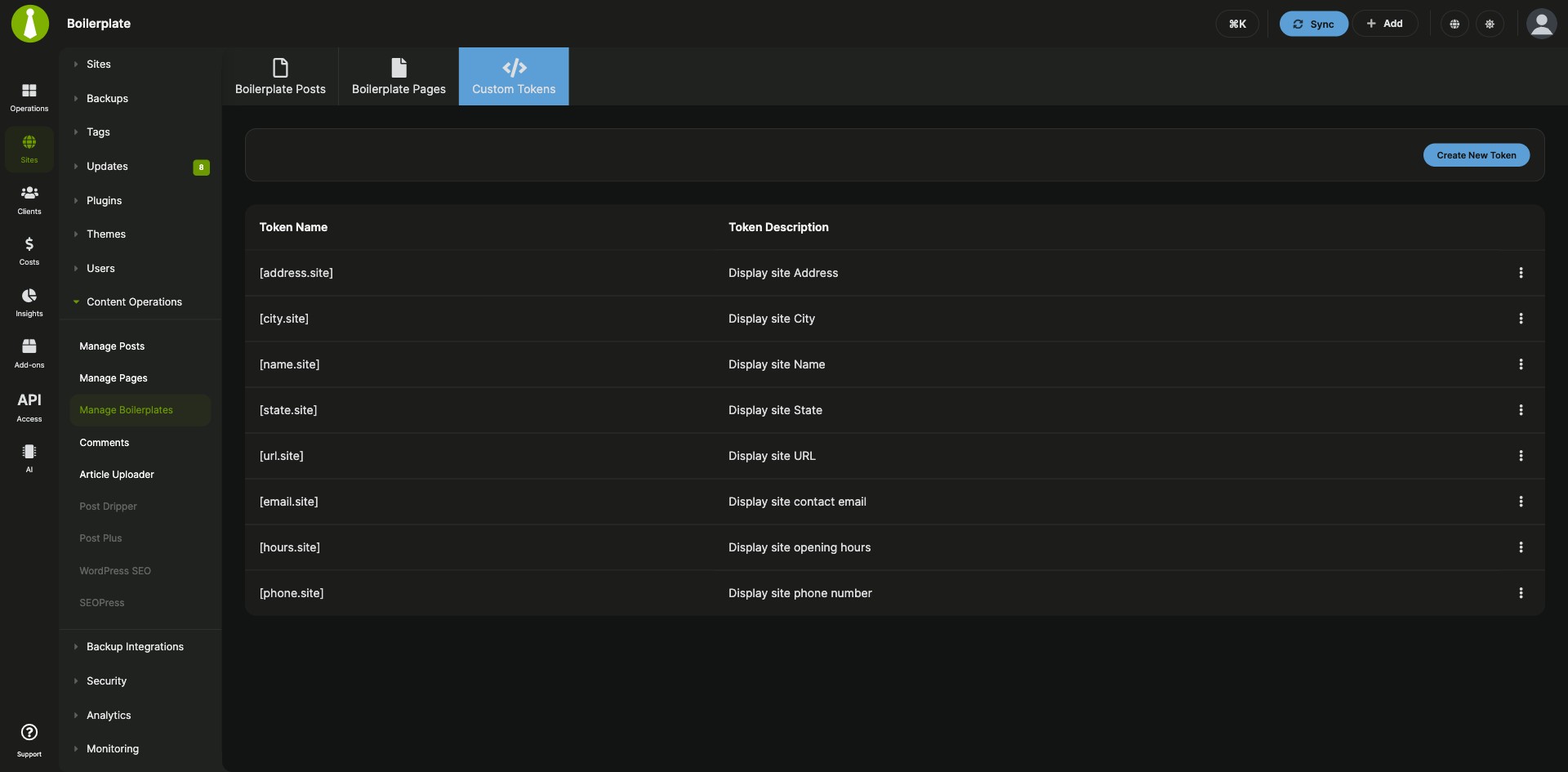
| Custom tokens | Create your own tokens with a name and a description on the Custom Tokens tab, then edit or delete them from the Tokens table. |
| Per-site token values | Enter each site’s values in the Boilerplate Tokens section of that site’s Edit page. They replace the tokens when you publish. |
| Tokens in titles and body text | Use tokens in the post or page title and body. Type a token or click it in the token list to insert it. |
| Edit once, update every site | Change a boilerplate post or page and click Update. The change goes to all child sites that have it. |
| Add or remove sites later | Select or unselect sites in the Select Sites section to publish a boilerplate to a new child site or take it off a site. |
| One place to manage it all | The Manage Boilerplates page has three tabs, Boilerplate Posts, Boilerplate Pages and Custom Tokens, with edit and delete actions for each item. |
Boilerplate Extension requirements
| Item | Requirement |
|---|---|
| License | MainWP Pro (included in the Pro Bundle) |
| MainWP Dashboard | The Boilerplate Extension installed and activated on your Dashboard site |
| Child sites | No third-party plugins. Each site needs values for the tokens you use. |
How to set up the Boilerplate Extension
Enter token values for each site
- Go to Sites > Manage Sites, find a site and click its Edit action.
- In the Boilerplate Tokens section, enter values for the tokens you plan to use.
- Click Update Site, then repeat for your other child sites.
Create a custom token
- Go to Sites > Content Operations > Manage Boilerplates > Custom Tokens.
- Click Create New Token.
- Enter a Token Name and a Token Description, then click Save Token. Leave out the [ ] brackets, because the extension adds them.
- Enter the new token’s value for each site, the same way as for the default tokens.
Don’t create tokens that the Clients feature and the Pro Reports Extension already use, such as [client.name] or [client.site.url].
Publish a boilerplate post or page
- Go to Sites > Content Operations > Manage Boilerplates and open the Boilerplate Posts or Boilerplate Pages tab.
- Click Create Boilerplate Post or Create Boilerplate Page.
- Write it like any other WordPress post or page, with tokens in the title and body where you need them.
- Select the child sites to publish to and click Publish.
Full instructions for tokens, posts and pages: Boilerplate Extension documentation.
How the Boilerplate Extension works
The Boilerplate Extension runs on your MainWP Dashboard and keeps your boilerplate posts, pages and tokens there. When you publish, each token is replaced with the value set for that child site, so every site gets its own version of the text. Deleting a boilerplate removes it from the extension, and the published posts and pages stay on your child sites.
Boilerplate Extension FAQ
Can one boilerplate page show different details on each site?
Yes, tokens such as [name.site] are replaced with each site’s own values when you publish, so each site shows its own details. You set those values in the Boilerplate Tokens section of the site’s Edit page under Sites > Manage Sites.
If I edit a boilerplate page, do my child sites update?
Yes, when you edit the page from the Boilerplate Pages tab under Sites > Content Operations > Manage Boilerplates and click Update, the change is applied to all child sites that have it. Boilerplate posts work the same way.
How do I add a boilerplate page to a newly connected child site?
Edit the boilerplate page, select the new site in the Select Sites section and click Update. To take a page off a site, unselect that site and click Update.
What happens to the pages on my child sites if I delete a boilerplate?
They stay on your child sites. The Delete action removes the boilerplate from the extension’s database only.
Do I need to install anything on my child sites?
Your child sites need no extra plugins for the Boilerplate Extension. It runs on your MainWP Dashboard and publishes regular WordPress posts and pages to the child sites you select. Each site only needs values for the tokens you use.
What do I need to pay for?
The Boilerplate Extension is part of MainWP Pro, included in the Pro Bundle. It needs no third-party plugins or services.
Where do I get support?
The Boilerplate Extension is developed by MainWP, so MainWP support handles all questions about it.